djl
Mask detection with YOLOv5 - training and inference
YOLOv5 is a powerful model for object detection tasks. With the transfer learning technique, a pre-trained YOLOv5 model can be utilized in various customized object detection tasks with relatively small dataset.
In this example, we apply it on the Face Mask Detection dataset. We first train the YOLOv5s model in Python, with the help of ATLearn, a python transfer learning toolkit. Then, the model is saved as an ONNX model, which is then imported into DJL for inference. We apply it on the mask wearing detection task.
The source code can be found at MaskDetectionOnnx.java
The training part in ATLearn
We initially attempted to import a pretrained YOLOv5 into DJL, and fine-tune it with the Face Mask Detection dataset, similar to Train ResNet for Fruit Freshness Classficiation. However, YOLOv5 can not be converted to a PyTorch traced model, due to its data-dependent execution flow (see this discussion), which blocks the idea of retraining a Yolov5 model in DJL. So the training part is entirely in python.
The retraining of YOLOv5 can be found in an example in ATLearn: examples/docs/face_mask_detection.md. In this example, the YOLOv5 layers near the input are frozen while those near the output are fine-tuned with the customized data. This follows the transfer learning idea.
In this example, the trained model is first exported to ONNX file, eg. mask.onnx and then imported in MaskDetectionOnnx.java.
This ONNX model file can also be used for inference in python, which will serve as a benchmark. See the tutorial doc.
Setup guide
To configure your development environment, follow setup.
Run mask detection example
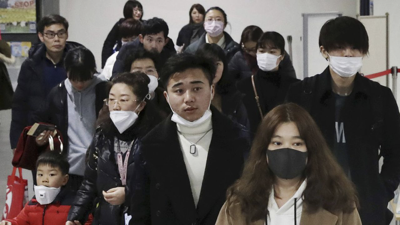
Input image file
We use the following image as input:
Build the project and run
Use the following command to run the project:
cd examples
./gradlew run -Dmain=ai.djl.examples.inference.cv.MaskDetection
Your output should look like the following:
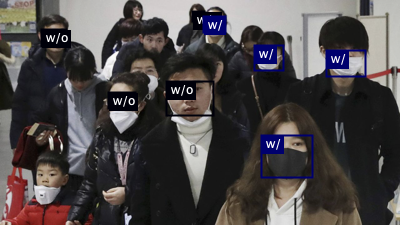
[INFO ] - Detected objects image has been saved in: build/output/face_mask_result.png
[INFO ] - {
	{"class": "w/o mask", "probability": 0.90062, "bounds": {"x"=0.416, "y"=0.362, "width"=0.121, "height"=0.158}}
	{"class": "w/ mask", "probability": 0.88587, "bounds": {"x"=0.653, "y"=0.603, "width"=0.130, "height"=0.189}}
	{"class": "w/ mask", "probability": 0.87304, "bounds": {"x"=0.816, "y"=0.224, "width"=0.100, "height"=0.117}}
	...
}
An output image with bounding box will be saved as build/output/detected-mask-wearing.png: